InnSync Developer Guide
Acknowledgements
This project is based on the AddressBook-Level3 project created by the SE-EDU initiative.
Setting up, getting started
Refer to the guide Setting up and getting started.
Design
Architecture
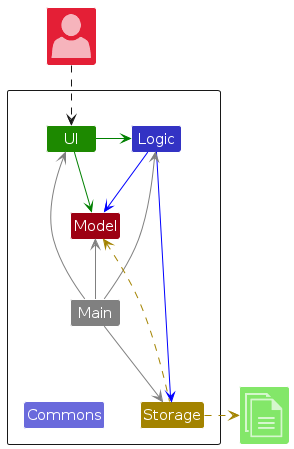
The Architecture Diagram given above explains the high-level design of the App.
Given below is a quick overview of main components and how they interact with each other.
Main components of the architecture
Main (consisting of classes Main and MainApp) is in charge of the app launch and shut down.
- At app launch, it initializes the other components in the correct sequence, and connects them up with each other.
- At shut down, it shuts down the other components and invokes cleanup methods where necessary.
The bulk of the app's work is done by the following four components:
UI: The UI of the App.Logic: The command executor.Model: Holds the data of the App in memory.Storage: Reads data from, and writes data to, the hard disk.
Commons represents a collection of classes used by multiple other components.
How the architecture components interact with each other
The Sequence Diagram below shows how the components interact with each other for the scenario where the AirBnB Host issues the command delete 1.
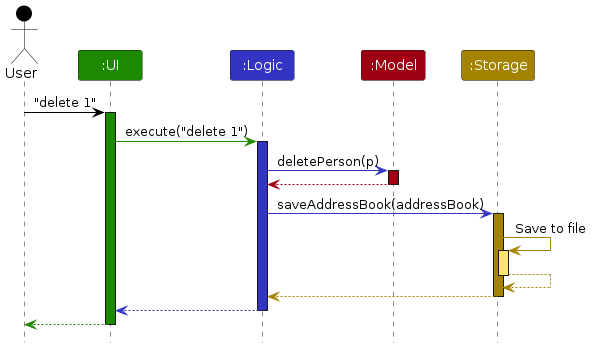
Each of the four main components (also shown in the diagram above),
- defines its API in an
interfacewith the same name as the Component. - implements its functionality using a concrete
{Component Name}Managerclass (which follows the corresponding APIinterfacementioned in the previous point.
For example, the Logic component defines its API in the Logic.java interface and implements its functionality using the LogicManager.java class which follows the Logic interface. Other components interact with a given component through its interface rather than the concrete class (reason: to prevent outside component's being coupled to the implementation of a component), as illustrated in the (partial) class diagram below.
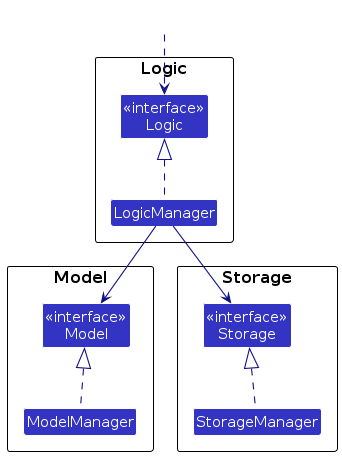
The sections below give more details of each component.
UI component
The API of this component is specified in Ui.java

The UI consists of a MainWindow that is made up of parts e.g.CommandBox, ResultDisplay, PersonListPanel, PersonDetailPanel, StatusBarFooter etc. All these, including the MainWindow, inherit from the abstract UiPart class which captures the commonalities between classes that represent parts of the visible GUI.
The UI component uses the JavaFx UI framework. The layout of these UI parts are defined in matching .fxml files that are in the src/main/resources/view folder. For example, the layout of the MainWindow is specified in MainWindow.fxml
The UI component,
- executes user commands using the
Logiccomponent. - listens for changes to
Modeldata so that the UI can be updated with the modified data. - keeps a reference to the
Logiccomponent, because theUIrelies on theLogicto execute commands. - depends on some classes in the
Modelcomponent, as it displaysPersonobject residing in theModel.
Logic component
API : Logic.java
Here's a (partial) class diagram of the Logic component:
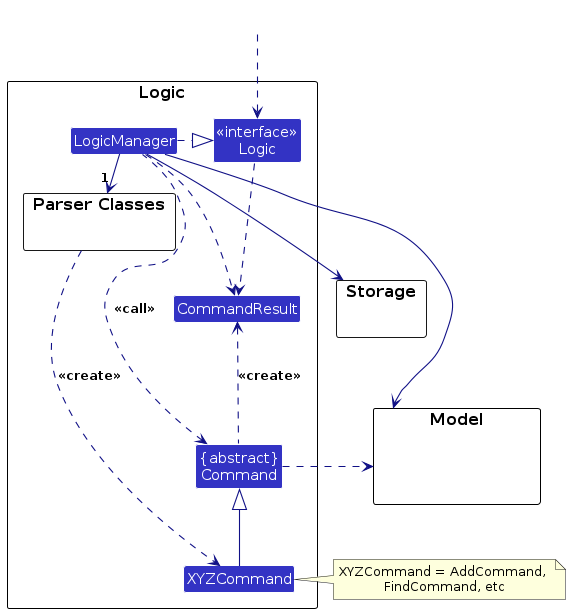
The sequence diagram below illustrates the interactions within the Logic component, taking execute("delete 1") API call as an example.

Note: The lifeline for DeleteCommandParser should end at the destroy marker (X) but due to a limitation of PlantUML, the lifeline continues till the end of diagram.
How the Logic component works:
- When
Logicis called upon to execute a command, it is passed to anAddressBookParserobject which in turn creates a parser that matches the command (e.g.,DeleteCommandParser) and uses it to parse the command. - This results in a
Commandobject (more precisely, an object of one of its subclasses e.g.,DeleteCommand) which is executed by theLogicManager. - The command can communicate with the
Modelwhen it is executed (e.g. to delete a visitor).
Note that although this is shown as a single step in the diagram above (for simplicity), in the code it can take several interactions (between the command object and theModel) to achieve. - The result of the command execution is encapsulated as a
CommandResultobject which is returned back fromLogic.
Here are the other classes in Logic (omitted from the class diagram above) that are used for parsing a user command:
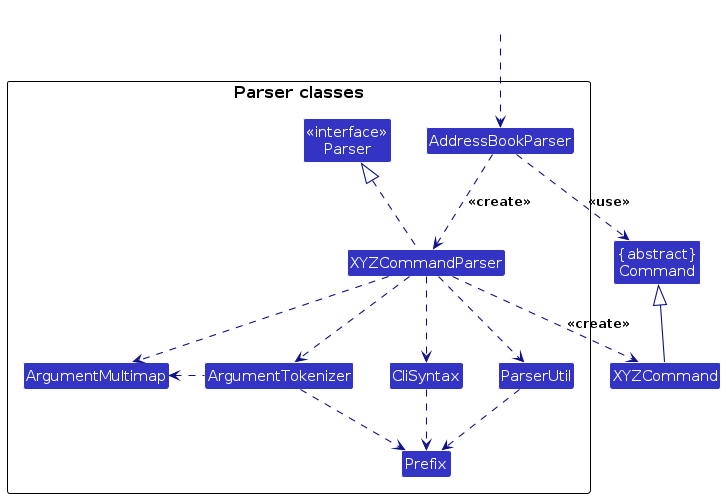
How the parsing works:
- When called upon to parse a user command, the
AddressBookParserclass creates anXYZCommandParser(XYZis a placeholder for the specific command name e.g.,AddCommandParser) which uses the other classes shown above to parse the user command and create aXYZCommandobject (e.g.,AddCommand) which theAddressBookParserreturns back as aCommandobject. - All
XYZCommandParserclasses (e.g.,AddCommandParser,DeleteCommandParser, ...) inherit from theParserinterface so that they can be treated similarly where possible e.g, during testing.
Model component
API : Model.java
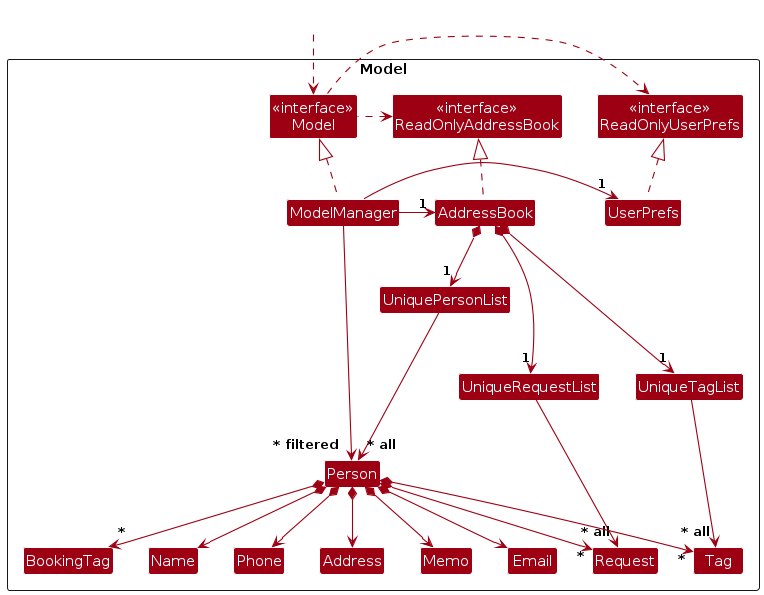
The Model component,
- stores the address book data i.e., all
Personobjects (which are contained in aUniquePersonListobject). - stores the currently 'selected'
Personobjects (e.g., results of a search query) as a separate filtered list which is exposed to outsiders as an unmodifiableObservableList<Person>that can be 'observed' e.g. the UI can be bound to this list so that the UI automatically updates when the data in the list change. - stores a
UserPrefobject that represents the user’s preferences. This is exposed to the outside as aReadOnlyUserPrefobjects. - does not depend on any of the other three components (as the
Modelrepresents data entities of the domain, they should make sense on their own without depending on other components)
Storage component
API : Storage.java
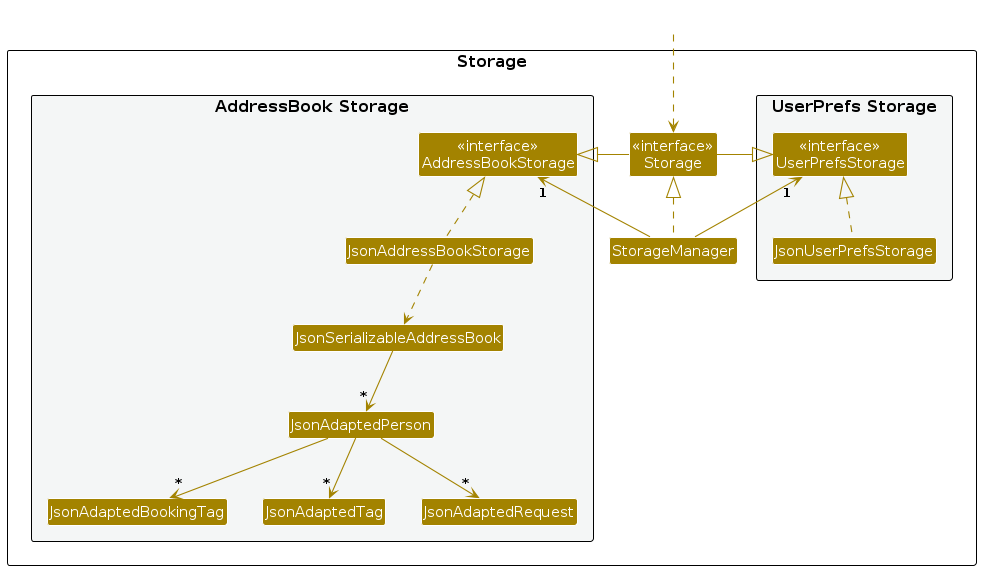
The Storage component,
- can save both address book data and user preference data in JSON format, and read them back into corresponding objects.
- inherits from both
AddressBookStorageandUserPrefStorage, which means it can be treated as either one (if only the functionality of only one is needed). - depends on some classes in the
Modelcomponent (because theStoragecomponent's job is to save/retrieve objects that belong to theModel)
Common classes
Classes used by multiple components are in the seedu.innsync.commons package.
Implementation
This section describes some noteworthy details on how certain features are implemented.
Please note that certain aspects, such as UML classes, may have been simplified to fit within the diagram's constraints and maintain readability.
1. Undo Implementation
The current undo feature undoes only the last recorded change, it does not maintain a history of commands or changes. Thus, users do not have the ability to undo more than one past change.
The proposed undo mechanism is facilitated by ModelManager. In addition to the addressBook variable which represents the current state of the address book, a second variable backupAddressBook representing the previous state of the address book is maintained.
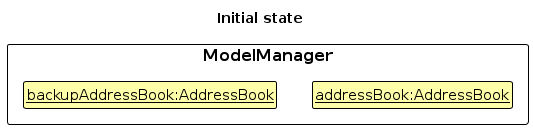
Whenever an operation modifying the address book is performed, the current address book is saved into the backup address book before the current address book is modified. ModelManager implements the method ModelManager#backupAddressBook() to achieve this.
When the undo command is performed, ModelManager will swap the contents of the address book with that of its backup through the implemented method ModelManager#revertToLastModified(). This operation is exposed in the Model interface as Model#revertToLastModified().
The following operations in ModelManager modify the address book and will hence result in a backup of the current address book:
ModelManager#setPerson()— Modifies a person in the address bookModelManager#addPerson()— Adds a person into the address bookModelManager#deletePerson()— Deletes a person from the address bookModelManager#setAddressBook()— Replaces the contents of the entire address bookModelManager#revertToLastModified()— Restores the previously undone address book state
Given below is an example usage scenario and how the undo mechanism behaves at each step.
Step 1. The user launches the application for the first time. The variable backupAddressBook will be initialized with the contents of the current address book, thus containing the same contents as there are no modifications yet.
Step 2. The user executes delete 5 command to delete the 5th person in the address book. The delete command calls ModelManager#backupAddressBook() and Model#deletePerson(), causing the current address book to be backed up into backupAddressBook, and the current addressbook to call AddressBook#removePerson().
Note: If a command fails its execution, it will not call any operations modifying the address book. Thus, ModelManager#backupAddressBook() is not called and the address book state will not be saved into the backup backupAddressBook.
Step 3. The user now decides that deleting the person was a mistake, and decides to undo that action by executing the undo command. The undo command will call Model#undoAddressBook(), which will shift the currentStatePointer once to the left, pointing it to the previous address book state, and restores the address book to that state.
Note: If the contents of backupAddressBook is the same as that of addressBook, then there are no previous AddressBook states to restore. ModelManager implements the method ModelManager#hasUndoState() to check if this is the case. If so, it will return an error to the user rather than attempting to perform the undo.
The following sequence diagram shows how an undo operation goes through the Logic component:

Note: The lifeline for UndoCommand should end at the destroy marker (X) but due to a limitation of PlantUML, the lifeline reaches the end of diagram.
Design considerations:
Aspect: How undo executes:
Alternative 1 (current choice): Saves the entire address book.
- Pros: Easy to implement.
- Cons: May have performance issues in terms of memory usage.
Alternative 2: Individual command knows how to undo by itself.
- Pros: Will use less memory (e.g. for
delete, just save the person being deleted). - Cons: We must ensure that the implementation of each individual command are correct.
- Pros: Will use less memory (e.g. for
2. List Star Implementation
The list star feature is facilitated by ListStarCommand. It extends the basic listing functionality with contact filtering capability, using an internal PREDICATE_SHOW_STARRED_PERSONS and Model#updateFilteredPersonList(). The supported operations are:
ListStarCommand#execute()- Filters the contact list to show only starred entriesModel#updateFilteredPersonList()- Updates the UI with the filtered results
Given below is an example usage scenario and how the list star mechanism behaves at each step.
Step 1. The user launches the application. The Model contains the full list of contacts (both starred and unstarred).
Step 2. The user executes liststar command to view starred contacts. The command is processed by:
LogicManagerreceiving the commandAddressBookParsercreating aListStarCommand- The command executing and applying the filter predicate
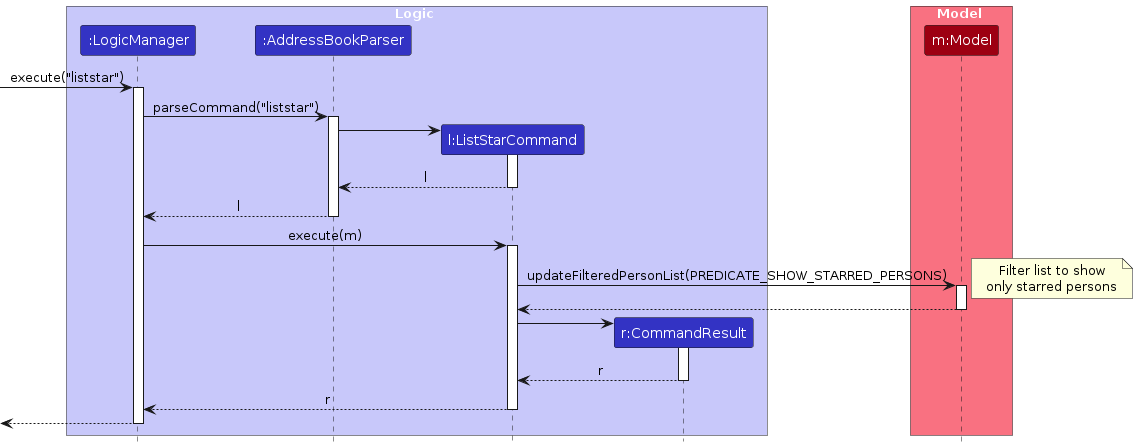
Step 3. The system updates the display to show only contacts where isStarred == true.
Note: If no contacts are starred, the filtered list will be empty. The command still succeeds as this is valid behaviour.
Step 4. The user sees only their starred contacts in the UI.
Design Considerations:
Aspect: How filtering executes:
Alternative 1 (current choice): Uses a predicate to filter the existing list
- Pros: Simple to implement, consistent with other commands
- Cons: Requires full list traversal
Alternative 2: Maintain a separate starred contacts list
- Pros: Faster access to favourites
- Cons: More complex synchronization, increased memory usage
Aspect: When to apply filtering:
Alternative 1 (current choice): Only when explicitly requested via
liststar- Pros: Clear user control, predictable behaviour
- Cons: Requires explicit command
Alternative 2: Automatically filter when starring/unstarring
- Pros: Immediate feedback
- Cons: May surprise users who want to see all contacts
Documentation, logging, testing, configuration, dev-ops
Appendix: Requirements
Product scope
Target user profile:
- is a host for guests to stay at one or more properties on hosting platforms (i.e. AirBnB)
- has a need to manage a significant number of contacts
- prefer desktop apps over other types
- can type fast
- prefers typing to mouse interactions
- is reasonably comfortable using CLI apps
Value proposition: Allows AirBnB hosts to manage all their property management related contacts faster than a typical mouse/GUI driven app
User stories
Priorities: High (must have) - * * *, Medium (nice to have) - * *, Low (unlikely to have) - *
| Priority | As a … | I want to … | So that I can… |
|---|---|---|---|
* * * | new user | see usage instructions | refer to instructions when I forget how to use the App |
* * * | AirBnB host | add a new visitor | keep track of who is visiting my property |
* * * | AirBnB host | edit a visitor | update details of a visitor |
* * * | AirBnB host | list all visitors | see all the visitors I have added |
* * * | AirBnB host | delete a visitor | remove entries that I no longer need |
* * * | AirBnB host | add a tag to visitor | categorize and identify them easily |
* * * | AirBnB host | add a booking tag to visitor | quickly assign the visitor to their property |
* * * | AirBnB host | remove a tag from the visitor | to unassign the visitor tag |
* * * | AirBnB host | remove a booking tag from the visitor | to unassign the visitor booking tag |
* * * | AirBnB host | find a visitor by name | quickly find a specific visitor |
* * | AirBnB host | filter visitors by property booked | quickly find visitors who visited a specific property |
* * | AirBnB host | filter visitors by date of stay | quickly find visitors using specific time periods |
* * | AirBnB host | filter visitors by tag | quickly find visitors using personalised categories |
* * | AirBnB host | filter visitors by next upcoming booking | prepare for future bookings efficiently |
* * | AirBnB host | add a request to visitor | fulfil the visitor request |
* * | AirBnB host | mark the request as completed in the visitor | to mark visitor request as fulfilled |
* * | AirBnB host | unmark the request as incomplete in the visitor | to unmark visitor request as unfulfilled |
* * | AirBnB host | delete the request from the visitor | to remove visitor request |
* * | AirBnB host | star a visitor | favourite the visitor so that they appear at the top |
* * | AirBnB host | unstar a visitor | unfavourite the visitor so that they no longer appear at the top |
* * | AirBnB host | list all the starred visitor | see all the favourite visitors I have starred |
* * | AirBnB host | add a memo to visitor | give a short note to describe the visitor |
* * | AirBnB host | undo the last command | recover from mistakes |
* * | AirBnB host | clear all visitors | start over with a clean slate |
* * | AirBnB host | save visitor details to a file | backup my address book |
* * | AirBnB host | load visitor details from a file | restore my address book |
* | AirBnB host with many visitors in the address book | sort visitors by name | find visitors efficiently |
Use cases
(For all use cases below, the System is InnSync and the Actor is AirBnB Host, unless specified otherwise)
Use case: UC01 - Add a visitor
MSS
- AirBnB Host requests to add a visitor with specified details.
- InnSync validates the input.
- InnSync adds the visitor.
- InnSync shows a success message. Use case ends.
Extensions
2a. The input format is invalid.
- 2a1. InnSync shows an error message and informs the AirBnB Host of the proper format.
Use case resumes at step 1.
- 2a1. InnSync shows an error message and informs the AirBnB Host of the proper format.
2b. The visitor already exists in InnSync.
- 2b1. InnSync shows an error message and informs the AirBnB Host that the visitor already exists.
Use case resumes at step 1.
- 2b1. InnSync shows an error message and informs the AirBnB Host that the visitor already exists.
Guarantees:
- The contact is successfully created and the stored in InnSync.
- Duplicate contacts will not happen.
Use case: UC02 - Delete a visitor
MSS
- AirBnB Host requests to delete a specific visitor.
- InnSync deletes the visitor.
- InnSync displays a message for successful deletion of a visitor's contact.
Use case ends.
Extensions
1a. The given index is invalid.
- 1a1. InnSync shows an error message and informs the AirBnB Host that the index is invalid.
Use case resumes at step 1.
- 1a1. InnSync shows an error message and informs the AirBnB Host that the index is invalid.
Guarantees: The contact is successfully deleted from InnSync, and any persistent storage.
Use case: UC03 - Edit a visitor
MSS
- AirBnB Host requests to list visitors
- InnSync shows a list of visitors
- AirBnB Host requests to edit a specific visitor in the list and enters the details
- InnSync validates the entered details
- InnSync updates the contact with the new provided details
- InnSync shows a success message and the updated details of the visitor.
Use case ends.
Extensions
2a. The list is empty.
- 2a1. InnSync shows an error message that there are no saved contacts.
Use case ends.
- 2a1. InnSync shows an error message that there are no saved contacts.
3a. The given index is invalid.
- 3a1. InnSync shows an error message.
Use case resumes at step 2.
- 3a1. InnSync shows an error message.
3b. Input argument(s) are invalid tag.
- 3b1. InnSync shows an error message.
Use case resumes at step 2.
- 3b1. InnSync shows an error message.
3c. The contact already exists in InnSync
- 3c1. InnSync shows an error message that the contact already exists.
Use case resumes at step 2.
- 3c1. InnSync shows an error message that the contact already exists.
Guarantees:
- The contact is successfully edited and the stored in InnSync.
- Any persistent storage have updated this contact.
- Duplicate contacts will not happen.
Use case: UC04 - Find a visitor
MSS
- AirBnB Host requests to find a visitor by specified detail (e.g name, address, phone etc.)
- InnSync validates the entered detail
- InnSync displays a list of contacts matching the specified detail.
Use case ends.
Extensions
2a. The given detail is invalid.
- 2a1InnSync shows an error message.
Use case resumes at step 1.
- 2a1InnSync shows an error message.
3a. The list is empty.
- 3a1. InnSync shows an error message that there are no contacts were found.
Use case ends.
- 3a1. InnSync shows an error message that there are no contacts were found.
Use case: UC05 - Add Tag to Contact
MSS
- AirBnB Host requests to list visitors
- InnSync shows a list of visitors
- AirBnB Host requests to add a tag to a specific visitor in the list
- InnSync validates the entered tag
- InnSync updates the contact with the new provided tag
- InnSync shows a success message with the updated details of the visitor.
Use case ends.
Extensions
2a. The list is empty.
- 2a1. InnSync shows an error message that there are no saved contacts.
Use case ends.
- 2a1. InnSync shows an error message that there are no saved contacts.
3a. The given index is invalid.
- 3a1. InnSync shows an error message.
Use case resumes at step 2.
- 3a1. InnSync shows an error message.
4a. Input argument(s) are invalid.
- 4a1. InnSync shows an error message.
Use case resumes at step 2.
- 4a1. InnSync shows an error message.
Guarantees:
- The booking tag is successfully added and the stored in InnSync.
- Any persistent storage have added the booking tag to the contact.
Use case: UC06 - Add Booking Tag to Contact
MSS
- AirBnB Host requests to list visitors
- InnSync shows a list of visitors
- AirBnB Host requests to add a booking tag to a specific visitor in the list
- InnSync validates the entered booking tag
- InnSync updates the contact with the new provided booking tag
- InnSync shows the updated details of the visitor.
Use case ends.
Extensions
2a. The list is empty.
- 2a1. InnSync shows an error message that there are no saved contacts.
Use case ends.
- 2a1. InnSync shows an error message that there are no saved contacts.
3a. The given index is invalid.
- 3a1. InnSync shows an error message.
Use case resumes at step 2.
- 3a1. InnSync shows an error message.
4a. Input argument(s) are invalid.
- 4a1. InnSync shows an error message.
Use case resumes at step 2.
- 4a1. InnSync shows an error message.
5a. The given booking tag date overlaps with an existing booking tag.
- 5a1. InnSync shows an error message.
Use case resumes at step 2.
- 5a1. InnSync shows an error message.
Use case: UC07 - List visitors
MSS
- AirBnB Host requests to list all visitors.
- InnSync displays a list of all visitors.
Extensions
2a. The list is empty.
- 2a1. InnSync shows a message that the list is empty.
Use case ends.
- 2a1. InnSync shows a message that the list is empty.
2b. InnSync is unable to get saved contacts.
- 2b1. InnSync informs the user that the file is corrupted.
Use case ends.
- 2b1. InnSync informs the user that the file is corrupted.
Use case: UC08 - Help
MSS
- AirBnB Host wants to see the user guide
- InnSync displays a hyperlink to the user guide
Use case ends.
Use case: UC09 - Clear
MSS
- AirBnB Host remove all visitor contacts in the database
- InnSync clears the database and updates local JSON file
Use case ends.
Use case: UC10 - Exit
MSS
- AirBnB Host wants to exit the application
- InnSync is terminated
Use case ends.
Non-Functional Requirements
- Should work on any mainstream OS as long as it has Java
17or above installed. - Should be able to hold up to 1000 visitors without noticeable sluggishness in performance for typical usage.
- A user with above average typing speed for regular English text (i.e. not code, not system admin commands) should be able to accomplish most of the tasks faster using commands than using the mouse.
- The application size should not be more than 100mb to enable user to have easy installation on various devices.
- The application should also be optimized such that its CPU and memory usage is low so that it can run on low-end machines.
- The system should be optimized for single-user operation instead of multiple-user operation.
- The application should not crash during network failures and be reliable enough for continuous use case during operation hours.
- The data used should be stored in a structured and human-readable format like JSON.
- Should be easily extendable so that new features can be added without having to refactor the entire project.
Glossary
- Mainstream OS: Windows, Linux, Unix, MacOS
- AirBnB host: An AirBnB host is an individual or business that list their property on the platform for short-term rentals. The host provide accommodations in the forms of apartments, houses or rooms for guests, typically for leisure activities.
- Visitor: Any individual who accesses an AirBnB property, including guests staying at the property, property owners, service providers performing work, or other authorized individuals. Visitors may include cleaners, maintenance personnel, property inspectors, delivery services, and other vendors.
- CLI (Command Line Interface): A text-based interface where users interact with the application with a keyboard typing commands instead of using a graphical user interface.
- JAR: A packed file format used in Java that contains compiled java codes to enable easy distribution, portability and execution that includes libraries and resources to allow the program to function.
- JSON (JavaScript Object Notation): A lightweight data format widely used for storing and exchanging structured data in a human-readable, that is often used in databases and APIs.
- GUI (Graphical User Interface): A visual graphical interface that allows users to interact with the application using various graphical elements like search boxes, buttons, text boxes, and eta.
- Prerequisite: A set of rules or instructions to be executed before prior to executing a particular task.
- MSS (Main Success Scenario):It describes the most straightforward interaction for a given use case, which assumes that nothing goes wrong.
- API (Application Programming Interface): A set of rules or protocols that govern the application to allow different software applications to work together by communication with each other.
Appendix: Effort
Difficulty Level: The project was moderately challenging due to the integration of multiple additional commands and person fields, and the complexity of building and maintaining relationships between them.
Challenges Faced and Achievements:
Addition of Person Fields: To better allow hosts to keep track of their visitors, we added booking tags into our system, a major feature which allowed hosts to associate a booking tag containing a property, start date, and end date, with a visitor. This information is crucial in recording a guest's period of stay at a property. Many tweaks to the system were necessary to accommodate the addition of this new field. In addition to the booking tag, we also allowed users to add requests, which could be marked as complete, and a memo, which could contain remarks about a visitor, to a contact.
Addition of Commands: We had to significantly modify existing commands (
add,find,edit), and include multiple new additional commands (tag,untag,req,mark,unmark,deletereq,liststar,memo) to accommodate the creation, modification and deletion of our added fields to each contact. In addition to those commands, we also added theundocommand to allow users to revert unintended changes. We also implemented a system which made dangerous commands such asclearrequire a confirmation to proceed. Finally, we added thestarfeature which allowed users to star contacts and have their favourite or most frequently accessed contacts displayed above the unstarred visitors.Parsing of parameters: In order to cater to the possibility of names containing prefixes, such as
murthu a/p varawhich contains thea/prefix used for addresses, we modified the existing parser system to allow prefixes to be escaped with the$symbol, allowing users more freedom in their choice of parameters.User Interface Enhancements: To make the GUI more appealing and intuitive, we revamped the GUI changing its overall look, including the addition of the Persons Detail Panel, into our layout. We successfully displayed a contact's details in the panel both when selecting their card in the GUI with a mouse, and when a contact's details is modified through a command.
Effort Required: We estimate that the project required more than double the expected effort due to the addition of various features, fields and commands in order to improve the user experience of the app and cater to the needs of our target users. We also exercised much effort in the testing of our program and complying with coding standards to ensure the maintainability of our program.
Appendix: Planned Enhancements
Team Size: 5
- Allow all command parsers to escape prefixes in all fields: Currently, only the
editandaddcommand allow escaping of prefixes such asa/,e/, and only in theNAMEargument. We plan to extend this feature to all commands and fields, in order to allow the user more freedom in their choice of arguments and keywords. - Stricter validation for email: The current validation for email only requires the existence of
@character, and does not require the domain to contain.. As such, invalid emails such asjohndoe@exampleandjd@mailwere accepted. In the future, we intend to modify the validation of the email parameter to require a., followed by at least two alphanumeric characters after the presence of@. - Different parameter prefixes for
REQUESTandREQUEST_INDEX: Both parametersREQUESTandREQUEST_INDEXcurrently share the same prefixr/. We plan to change the parameter ofREQUEST_INDEXto useri/instead to avoid confusion. - Allow phone numbers to contain dashes and brackets: The current
PHONEparameter does not allow the presence of brackets(,)and dashes-. Due to this, users are unable to add numbers in formats such as+1-242-3887654and+1 (242) 3887654. We plan to modify the validation for thePHONEparameter to allow these characters. - Unique index for booking tags: Currently, booking tags are identified by a combination of their property name, start date and end date. This results in inconvenience for users when using the
untagcommand, due to having to re-enter all three parameters. We plan to provide a form of unique identification for booking tags to allow for easier deletion of booking tags in the future. - Edit request command: The only way to edit a request of a contact is to delete it and add it again. We intend to add an edit request command to allow users the functionality of editing requests belonging to a contact.
- Case-insensitive command words: The current command words are case-sensitive. However, users may enter
AddorADDinstead ofaddby mistake. For convenience, we plan to modify the validation of command words to be case-insensitive. - Make
editsuccess messages more detailed: The currenteditcommand's success message does not contain details of what was modified. We plan to make the success message more descriptive. - Specificity of error messages: The current error messages for invalid command formats are too general. We plan to make error messages more specific by including the parameter which caused it (where applicable) and the reason it failed.
- Allow specific tags and booking tags to be edited: Currently, the only way to edit a tag or booking tag is to delete it and add it again. We plan to add a command to allow users to edit tags and booking tags directly.
Appendix: Instructions for manual testing
Given below are instructions to test the app manually.
Note: These instructions only provide a starting point for testers to work on; testers are expected to do more exploratory testing.
Launch and shutdown
Initial launch
Download the jar file and copy into an empty folder
Open a new terminal and navigate to the directory containing the jar file
Run the jar file using the command
java -jar innsync.jar.
Expected: Shows the GUI with a set of sample contacts. The window size may not be optimum.
Saving window preferences
Resize the window to an optimum size. Move the window to a different location. Close the window.
Re-launch the app using the command
java -jar innsync.jar.
Expected: The most recent window size and location is retained.
Listing all visitors
Listing all visitors when there are no contacts
Prerequisites: No contacts in addressbook. This can be done using the
clearcommand.Test case:
list
Expected: No contacts displayed in list.
Output: There are no contacts in the address book. Use the 'add' command to create new contacts!Other incorrect list commands to try:
List,listx,...
Expected: Error message displayed in status message.
Output: Unknown command! (o´_`o)
Listing all visitors when there is at least one contact in address book
Prerequisites: At least one contact in address book.
Test case:
list
Expected: All contacts displayed in list. Starred visitors will be shown first, followed by unstarred visitors. Both groups will be sorted lexicographically within their respective groups.
Output: List successful! (๑˘︶˘๑)
Listing all persons in the address book!Other incorrect list commands to try:
List,listx,...
Expected: Error message displayed in status message.
Output: Unknown command! (o´_`o)
Deleting a visitor
Deleting a visitor while all visitors are being shown
Prerequisites: List all visitors using the
listcommand. Multiple visitors in the list.Test case:
delete 1
Expected: First contact is deleted from the list. Details of the deleted contact shown in the status message.
Output: Delete successful! (๑˘︶˘๑)
NAME has been deleted from the address book!Test case:
delete 0
Expected: No visitor is deleted. Error details shown in the status message.
Output: Index is not a non-zero unsigned integer. ヾ( ・`⌓´・)ノ゙
delete: Deletes the person identified by the index number used in the displayed person list.
Parameters: INDEX (must be a positive integer)
Example: delete 1Other incorrect delete commands to try:
Delete,deletex,...
Expected: Similar to previous.
Output: Index is not a non-zero unsigned integer. ヾ( ・`⌓´・)ノ゙
delete: Deletes the person identified by the index number used in the displayed person list.
Parameters: INDEX (must be a positive integer)
Example: delete 1
Adding a visitor
Adding a visitor who is not currently in the addressbook
Prerequisites: No visitor with matching phone number and email address is displayed in addressbook when using
listcommand.Test case:
add n/John Doe a/John Doe Street e/johndoe@example.com p/+65 8888 8888
Expected: Contact is added to list. Contact List Card is selected in GUI. Contact Details are shown in Details Panel in GUI. Details of the added contact shown in the status message.
Output: Add successful! (๑˘︶˘๑)
John Doe; Phone: +65 8888 8888; Email: johndoe@example.com; Address: John Doe Street; Memo: ; Requests: ; BookingTags: ; Tags: ; Starred: false has been added to the address book!Test case:
add n/John Doe a/John Doe Street e/jd@example.com p/+65 88888888 t/guest m/no room cleaning b/StarHotel from/2025-04-01 to/2025-04-05 r/Needs Laundry Detergent
Expected: Contact is added to list. Contact List Card is selected in GUI. Contact Details are shown in Details Panel in GUI. Details of the added contact shown in the status message.
Output: Add successful! (๑˘︶˘๑)
John Doe; Phone: +65 88888888; Email: jd@example.com; Address: John Doe Street; Memo: no room cleaning; Requests: [Needs Laundry Detergent]; BookingTags: [StarHotel]; Tags: [guest]; Starred: false has been added to the address book!Test case:
add n/John Doe
Expected: No visitor is added. Error details shown in the status message.
Output: Invalid command format! ヾ( ・`⌓´・)ノ゙
add: Adds a person to the address book. Parameters: n/NAME p/PHONE e/EMAIL a/ADDRESS [r/REQUEST...] [b/BOOKING_TAG...] [t/TAG...] [m/MEMO]
Example: add n/John Doe p/+65 98765432 e/johnd@example.com a/311, Clementi Ave 2, #02-25 b/Beach House from/2025-06-01 to/2025-06-10 t/owes money m/Wants extra foodTest case:
add n/John Doe a/John Doe Street e/johndoe@example.com p/123
Expected: No visitor is added. Error details shown in the status message.
Output: Phone numbers should be in format +[COUNTRY_CODE] [NUMBER],
the country code must be valid and the number should be
at least 7 digits long and at most 15 digits long.Other incorrect add commands to try:
Add,add abc,...
Expected: No visitor is added. Error details shown in the status message.
Output: Unknown command! (o´_`o)
Starring a visitor
Starring a visitor who is currently in the addressbook while all visitors are being shown
Prerequisites: List all visitors using the
listcommand. At least two visitors in the list. Both visitors are unstarred.Test case:
star 2
Expected: Second contact is starred. Contact List Card is selected in GUI. Contact Details of the starred visitor are shown in Details Panel in GUI. Details of the starred contact shown in the status message.
Output: Star successful! (๑˘︶˘๑)
Starred contact: NAMETest case:
star 1
Note: Attempt to star a visitor who is already starred. The new first contact in the list should be the one you just starred in the above test case.
Expected: Error details shown in the status message.
Output: Star failed! (o´_`o)
Contact NAME is already starred!Test case:
star 0
Expected: No visitor is starred. Error details shown in the status message.
Output: Index is not a non-zero unsigned integer. ヾ( ・`⌓´・)ノ゙
star: Stars the contact identified by the index number used in the displayed person list.
Parameters: INDEX (must be a positive integer)
Example: star 1Other incorrect star commands to try:
Star,starx,...
Expected: Similar to previous.
Output: Unknown command! (o´_`o)
Unstarring a visitor
Unstarring a visitor who is currently starred in the addressbook while all visitors are being shown
Prerequisites: List all visitors using the
listcommand. Multiple visitors in the list with at least one starred.Test case:
unstar 1
Note: First contact in the list should be starred.
Expected: Contact with respective INDEX is un starred and will be moved back in the list sorted lexicographically among the unstar visitor. Contact Details of the unstar visitor are shown in Details Panel in GUI.
Output: Unstar successful! (๑˘︶˘๑)
The contact NAME was unstarred!Test case:
unstar INDEX
Note: Attempt to unstar the same visitor you just unstarred in the above test case by locating and using the new index of that same visitor.
Expected: Error details shown in the status message.
Output: Unstar failed! (o´_`o)
The contact NAME was not starred!Test case:
unstar 0
Expected: No visitor is unstarred. Error details shown in the status message.
Output: Index is not a non-zero unsigned integer. ヾ( ・`⌓´・)ノ゙
unstar: Unstars the contact identified by the index number used in the displayed person list.
Parameters: INDEX (must be a positive integer)
Example: unstar 1Other incorrect unstar commands to try:
Unstar,unstarx,...
Expected: Similar to previous.
Output: Unknown command! (o´_`o)
Adding a request to a visitor
Adding a request to a visitor who is currently in the addressbook while all visitors are being shown
Prerequisites: List all visitors using the
listcommand. At least one visitor in the list.Test case:
req 1 r/REQUEST
Note: First contact in the list should not already have the request "REQUEST".
Expected: First contact in the list has "REQUEST" added to its request list. Contact Details of the visitor are shown in Details Panel in GUI.
Output: Add request successful! (๑˘︶˘๑)
Added request to NAME!Test case:
req 1 r/REQUEST
Note: Perform the previous test case first to ensure that the first contact in the list has the request "REQUEST".
Expected: No request will be added. Error details shown in the status message.
Output: Command will result in duplicate request!Test case:
req 1 r/ASD r/ASD
Expected: No request will be added. Error details shown in the status message.
Output: Command will result in duplicate request!Test case:
req 1 r/
Expected: No request will be added. Error details shown in the status message.
Output: Request cannot be empty!Test case:
req r/
Expected: No visitor will have a request added. Error details shown in the status message.
Output: Index is not a non-zero unsigned integer. ヾ( ・`⌓´・)ノ゙
req: Adds a request to the contact identified by the index number in the displayed person list.
Parameters: INDEX (must be a positive integer) r/REQUEST
Example: req 1 r/Need a bottle of champagne every morningTest case:
req 0 r/
Expected: No visitor will have a request added. Error details shown in the status message.
Output: Index is not a non-zero unsigned integer. ヾ( ・`⌓´・)ノ゙
req: Adds a request to the contact identified by the index number in the displayed person list.
Parameters: INDEX (must be a positive integer) r/REQUEST
Example: req 1 r/Need a bottle of champagne every morningTest case:
req 1 r/asd
Note: Attempt to add a request when there is no visitor in the list.
Expected: No visitor will have a request added. Error details shown in the status message.
Output: The person index provided is invalid! ヾ( ・`⌓´・)ノ゙Test case:
req 1 r/
Expected: No visitor will have a request added. Error details shown in the status message.
Output: Request cannot be empty!Other incorrect req commands to try:
Req,reqx,...
Expected: Similar to previous.
Output: Unknown command! (o´_`o)
Marking a request of a visitor
Marking a request of a visitor who is currently in the addressbook
Prerequisites: List all visitors using the
listcommand. At least one visitor in the list with at least one unmarked request.Test case:
mark 1 r/1
Expected: First request of visitor is marked as complete. Contact Details of the starred visitor are shown in Details Panel in GUI. Checkbox of first request in list is ticked.
Output: Mark request successful! (๑˘︶˘๑)
Marked request as completed!Test case:
mark 1 r/1
Note: Attempt to mark the same request you marked in the above test case.
Expected: Error details shown in the status message.
Output: The request REQUEST is already marked!(o´_`o)Test case:
mark 0 r/1
Expected: No request is marked. Error details shown in the status message.
Output: Index is not a non-zero unsigned integer. ヾ( ・`⌓´・)ノ゙
mark: Marks a request of the contact identified by the index number in the displayed person list as completed.
Parameters: INDEX (must be a positive integer) r/REQUEST_INDEX (must be a positive integer)
Example: mark 1 r/1Other incorrect mark commands to try:
Mark,markx,...
Expected: Similar to previous.
Output: Unknown command! (o´_`o)
Unmarking a request of a visitor
Unmarking a request of a visitor who is currently in the addressbook
Prerequisites: List all visitors using the
listcommand. At least one visitor in the list with at least one marked request.Test case:
unmark 1 r/1
Expected: First request of visitor is marked as complete. Contact Details of the starred visitor are shown in Details Panel in GUI. Checkbox of first request in list is not ticked.
Output: Unmark request successful! (๑˘︶˘๑)
REQUEST has been unmarked!Test case:
unmark 1 r/1
Note: Attempt to unmark the same request you unmarked in the above test case.
Expected: No request will be unmarked. Error details shown in the status message.
Output: Unmark request failed! (o´_`o)
The request REQUEST is not marked!Test case:
unmark 0 r/1
Expected: No request will be unmarked. Error details shown in the status message.
Output: Index is not a non-zero unsigned integer. ヾ( ・`⌓´・)ノ゙
unmark: Unmarks a request of the contact identified by the index number in the displayed person list from its completion status.
Parameters: INDEX (must be a positive integer) r/REQUEST_INDEX (must be a positive integer)
Example: mark 1 r/1Other incorrect unmark commands to try:
Unmark,unmarkx,...
Expected: Similar to previous.
Output: Unknown command! (o´_`o)
Deleting a request
Deleting a request from a visitor who has requests
Prerequisites: List all visitors using the
listcommand. At least one visitor with at least one request.Test case:
deletereq 1 r/1
Expected: The specified request is deleted from the visitor. Contact Details of the visitor are shown in Details Panel in GUI.
Output: Delete request successful! (๑˘︶˘๑)
REQUEST has been deleted from NAME's request list!Test case:
deletereq 1 r/REQUEST_INDEX
Note: Use a value for REQUEST_INDEX that is greater than the number of requests the visitor has.
Expected: No request is deleted. Error details shown in the status message.
Output: This contact does not have a request of this index! (o´_`o)Test case:
deletereq 0 r/1
Expected: No request is deleted. Error details shown in the status message.
Output: Index is not a non-zero unsigned integer. ヾ( ・`⌓´・)ノ゙
deletereq: Deletes a request from the contact identified by the index number in the displayed person list.
Parameters: INDEX (must be a positive integer) r/REQUEST_INDEX (must be a positive integer)
Example: deletereq 1 r/1Test case:
deletereq 1 r/0ordeletereq 1 r/x(where x is a non-numeric character)
Expected: No request is deleted. Error details shown in the status message.
Output: Request index is not a non-zero unsigned integer. ヾ( ・`⌓´・)ノ゙
deletereq: Deletes a request from the contact identified by the index number in the displayed person list.
Parameters: INDEX (must be a positive integer) r/REQUEST_INDEX (must be a positive integer)
Example: deletereq 1 r/1Other incorrect deletereq commands to try:
Deletereq,deletereqx,...
Expected: Similar to previous.
Output: Unknown command! (o´_`o)
Tagging a visitor
Tagging a visitor who is currently in the addressbook with a tag/booking tag while all visitors are being shown.
Prerequisites: List all visitors using the
listcommand. At least one visitor in the list.Test case:
tag 1 t/Example
Note: First contact should not already have the tagExample.
Expected: First contact is tagged. Contact List Card is selected in GUI. Contact Details of the tagged visitor are shown in Details Panel in GUI.
Output: Tag successful! (๑˘︶˘๑)
NAME's tag list has been updated!Test case:
tag 1 t/Example
Note: Perform the previous test case first. First contact should already have the tagExample.
Expected: Command will result in duplicate [Example]!Test case:
tag 1 b/Example from/2023-10-01 to/2023-10-31
Expected: First contact is tagged. Contact List Card is selected in GUI. Contact Details of the tagged visitor are shown in Details Panel in GUI.
Output: Tag successful! (๑˘︶˘๑)
NAME's tag list has been updated!Test case:
tag 1 b/Example from/2023-10-01 to/2023-10-31
Note: Perform the previous test case first. First contact should already have the booking tagExample from/2023-10-01 to/2023-10-31.
Output: Tag failed! (o´_`o)
Example 01 Oct 23 to 31 Oct 23 already exists in the contact's tag list!Test case:
tag 1 b/Example from/ to/2023-10-31
Expected: No visitor is tagged. Error details shown in the status message.
Output: Start date cannot be empty!Test case:
tag 1 b/Example from/2023-02-29 to/2023-10-31
Expected: No visitor is tagged. Error details shown in the status message.
Output: Start date is invalid!Test case:
tag 1 b/Example from/2023-10-01 to/
Expected: No visitor is tagged. Error details shown in the status message.
Output: End date cannot be empty!Test case:
tag 1 b/Example from/2023-02-01 to/2023-02-29
Expected: No visitor is tagged. Error details shown in the status message.
Output: End date is invalid!Test case:
tag 1 b/Example from/2023-10-01 to/2023-09-30
Expected: No visitor is tagged. Error details shown in the status message.
Output: Error: Booking tag start date must be before end date.Test case:
tag 1 b/Example from/2023-10-01ortag 1 b/Example to/2023-10-31
Expected: No visitor is tagged. Error details shown in the status message.
Output: Booking tags should be of the format PROPERTY from/START_DATE to/END_DATE where START_DATE and END_DATE are in the format yyyy-MM-dd.
The START_DATE must be before END_DATE.
PROPERTY must have 1 to 170 characters.Test case:
tag 0ortag
Expected: No visitor is tagged. Error details shown in the status message.
Output: Invalid command format! ヾ( ・`⌓´・)ノ゙
tag: Adds tag to the contact identified by the index number in the displayed person list.
Parameters: INDEX (must be a positive integer) t/TAG or
b/PROPERTY from/START_DATE to/END_DATE
Example: tag 1 t/friends
Example: tag 1 b/property from/2023-10-01 to/2023-10-31Test case:
tag INDEX t/ortag INDEX b/
Note: INDEX should be a valid index of a visitor in the list.
Expected: No visitor is tagged. Error details shown in the status message.
Output: Tag cannot be empty!Other incorrect tag commands to try:
Tag,tagx,...
Expected: Similar to previous.
Output: Unknown command! (o´_`o)
Untagging a visitor
Untagging a visitor's tag/booking tag who is currently in the addressbook while all visitors are being shown.
Prerequisites: List all visitors using the
listcommand. At least one visitor in the list.Test case:
untag 1 t/Example
Note: First contact should have the tagExample.
Expected: First contact is untagged. Contact List Card is selected in GUI. Contact Details of the untagged visitor are shown in Details Panel in GUI.
Output: Untag successful! (๑˘︶˘๑)
[Example] has been removed from the contact's tag list!Test case:
untag 1 t/Example
Note: Perform the previous test case first. First contact should not have the tagExample.
Expected: Untag failed! (o´_`o)
Contact does not have the tag [Example]!Test case:
untag 1 b/Example from/2023-10-01 to/2023-10-31
Expected: First contact is untagged. Contact List Card is selected in GUI. Contact Details of the untagged visitor are shown in Details Panel in GUI.
Output: Untag successful! (๑˘︶˘๑)
Example 01 Oct 23 to 31 Oct 23 has been removed from the contact's tag list!Test case:
untag 1 b/Example from/2023-10-01 to/2023-10-31
Note: Perform the previous test case first. First contact should not have the booking tagExample from/2023-10-01 to/2023-10-31.
Expected: Untag failed! (o´_`o)
Contact does not have the booking tag Example 01 Oct 23 to 31 Oct 23!Test case:
untag 1 t/
Expected: No visitor is untagged. Error details shown in the status message.
Output: Tag cannot be empty!Test case:
untag 1 b/
Expected: No visitor is untagged. Error details shown in the status message.
Output: Booking tags should be of the format PROPERTY from/START_DATE to/END_DATE where START_DATE and END_DATE are in the format yyyy-MM-dd.
The START_DATE must be before END_DATE.
PROPERTY must have 1 to 170 characters.Test case:
untag 0oruntag
Expected: No visitor is untagged. Error details shown in the status message.
Output: Invalid command format! ヾ( ・`⌓´・)ノ゙
untag: Removes tag from the contact identified by the index number in the displayed person list.
Parameters: INDEX (must be a positive integer) t/TAG
OR b/PROPERTY from/START_DATE to/END_DATE
Example: untag 1 t/friends
Example: untag 1 b/property from/2023-10-01 to/2023-10-31Other incorrect untag commands to try:
Untag,untagx,...
Expected: Similar to previous.
Output: Unknown command! (o´_`o)
Saving data
Dealing with missing data files
Navigate to the directory containing the .jar file
Navigate into the 'data/' folder and locate the data file 'addressbook.json'
Delete the file 'addressbook.json'
Attempt to run the app.
Expected: App populates address book with default list of contacts
Dealing with corrupted data files
Navigate to the directory containing the .jar file
Navigate into the 'data/' folder and locate the data file 'addressbook.json'
Open the file and delete a semicolon (';'), or add random characters such as '/' anywhere in the file
Attempt to run the app.
Expected: App starts up using an empty address book.